Posts

Adding A Camera To See The Cats Face
Image
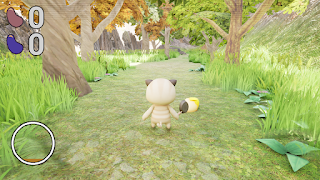
 One of the customization options for the players Cat is the cats face but you never see the cats face in game since we do not have cutscenes.  This is necessarily a gameplay problem for the player but some players might find it odd to pick the cats face but be unable to see it at any point in the game.  This gave me an idea to use a camera of the cats face in the  dialog box instead of a drawn sprite. Example  Dialog box Author: Krishnie Katie Naidoo Posted on 11/16/2023

Refactoring Due To Change

Image
 During the final week of our group project focused on creating a third-person platforming RPG game, a significant challenge emerged with one of the UI elements I was responsible for. The specific UI component, crucial for the overall player experience, suddenly stopped working. This unexpected setback added a layer of complexity during our critical final stages, requiring swift and effective resolution to ensure the project's success. To address the malfunctioning UI element, I immediately delved into debugging to identify the root cause. After thorough analysis, it became apparent that recent changes in other scripts had inadvertently impacted the functionality of the UI component. Recognizing the need for a systematic solution, I undertook a refactoring process to align the affected section of code with the modifications introduced in other parts of our project. This careful adjustment not only resolved the immediate issue but also ensured the seamless integration of our UI el...

Post-Mortem, My Final Blog.

  During the last week, I dedicated my time to ensuring the final project was in optimal condition for our post-mortem analysis. While conducting the final playthrough of the title, we encountered a sudden crash. Initially, the cause of the crash eluded us. Employing the IDE and the game engine, I systematically tested various features and scrutinized crash reports. Although reproducing the crash proved challenging, recording video during testing allowed for a detailed examination, revealing similarities between occurrences.   Through the use of these diagnostic tools, I identified the crash as resulting from a double call of the power-ups, leading to an access violation. Armed with this insight, I promptly implemented a straightforward safety net to prevent the recurrence of this issue. Author: Justin Bethea Date: 12/14/23

Comment On Your Code!

Image
  In the last week of our group project, while immersed in code cleanup and finalizing our Post-Mortem presentation, a notable challenge arose related to the absence of a standardized commenting style within our codebase. The lack of consistency in commenting practices made it challenging for team members to grasp the intricacies of different sections of code, leading to confusion and a slowdown in our progress. The issue of poor commenting not only hindered immediate collaboration but also posed potential challenges for future maintenance and scalability. To address the problem of inconsistent commenting, our team opted for a pragmatic solution. We initiated a discussion to collaboratively define a simple yet effective commenting style that everyone could adopt. This involved agreeing on conventions for documenting functions, explaining complex logic, and providing context for important decisions. While we didn't enforce an overly rigid style, the goal was to establish a set of gu...

A Reflective Journey through the Final Push at Full Sail University

Image
  This week, our primary emphasis was on refining code, implementing necessary refactors, and addressing bugs as we geared up for our upcoming post-mortem event. The past month posed challenges for our team, as various external commitments vied for our attention during the final days of our time here at Full Sail. Despite these obstacles, we proactively managed our schedules, ensuring that everyone was aligned on project timelines and availability.   Maintaining constant communication and unwavering focus allowed our team to sustain momentum and dedication towards our project goals. As our time at Full Sail nears its conclusion, the Windiego team executed a final, concerted effort to ensure that our project reflects the high standards we set for ourselves. This journey has been nothing short of remarkable, thanks to an amazing team.   From the beginning of our project in month one to its peak in month four, our team collaborated seamlessly, crafting something we c...

Finding The Missing Sprites

Image
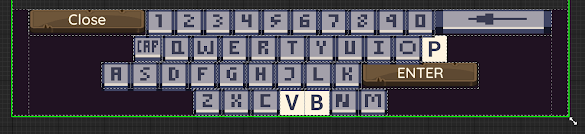
 I was working on a virtual keyboard and issue I ran into was the sprite sheet missing a few letters.  This is an issue for the player since they need to be able to read what a key is. TEMP FIX WITH THE MISSING SPRITES  To get around this till I could find a new sprite sheet or draw the missing letters. I made a temporary button with text. When I was in the process of drawing the missing letters it occurred to me that they were not missing it was just the style of font that made it seem that way. Author: Krishnie Katie Naidoo Posted on 12/07/2023

NPC's and Data Tables

Image
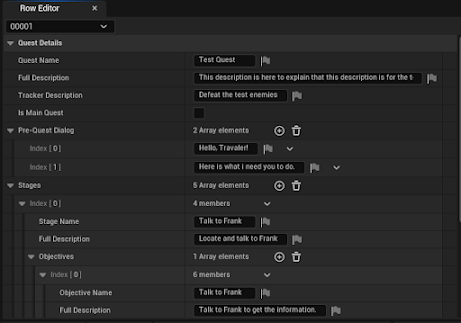
  In the latest strides of our Unreal Engine 5 project, my primary focus this week honed in on refining our quest system. A noticeable snag arose as NPCs within the game failed to accurately communicate information to the quest log. The crux of the issue lay in the NPCs misreporting crucial details sourced from their designated data tables, introducing a disruptive glitch that hindered the seamless progression of our game. Specifically, the NPCs were not extracting the correct information from the data tables, jeopardizing the fluidity of the player's journey. To address this dilemma, a targeted solution was implemented. Upon investigating Unreal Engine 5's editor functionalities, it became apparent that the NPCs' exposed properties needed an update. By diligently aligning and fine-tuning these properties, I successfully restored the proper information flow. This intervention ensured that the quest log now updates accurately based on player interactions with NPCs throughout...

Finding A way Around Subwidgets Styles Not Being Exposed To Edit

Image
  In Unreal Widgets that are added as Sub Widgets usually have parts that are not visible In the main Widgets details panel when the subwidget is selected. This can be an issue If you want to alter values in a subwidget. For example I wanted the option to change a subwidgets buttons styles for its different states.  The reason this was can be a problem for the player is that the different states and their associated look are what communicate to the player the  current interaction state of a button. It lets a player know which one they have selected, Which are disabled or enabled. If these aren't able to be set it can lead to confusion for the player. The solution lead to some menus already using a subwidget needing it to be set back to default to use new changes.(ABOVE IMAGE) To get around it being hidden I added Variables that would be exposed if the widget was a subwidget that are connected to the button in the subwidget. This is great as it left the option to change th...

Addressing Feedback on Guard AI

  Due to external commitments, my involvement in the project has experienced a slowdown. Nevertheless, I've initiated efforts to address a crucial issue related to player feedback. Currently, the guard AI lacks clarity for players, specifically regarding the inability to inflict damage to the front position of the enemy, emphasizing the necessity to strike from behind. To enhance player understanding, our aim is to incorporate both audio and visual cues that signal a failure in dealing damage when attacking from the front. Additionally, we're exploring the implementation of a tutorial pop-up to forewarn players about this particular type of enemy. Author: Justin Bethea Date: 12/1/23

Thanksgiving Week

  Embracing the spirit of Thanksgiving, this week served as a reminder that amidst the hustle and bustle of work, prioritizing moments to recharge and nurture our well-being is equally vital. Fortunately, thus far in the month, this project has unfolded seamlessly, free from any significant errors or challenges. I must express my gratitude to the incredible team I've collaborated with so far; their dedication and cooperation have been nothing short of amazing. Looking ahead, I aspire to maintain these valuable connections. Wishing everyone a wonderful Thanksgiving filled with gratitude and joy! Author: Justin Bethea Post: 11/25/2023

Widget Animations In C++

Image
 I chose to implement an animated widget utilizing c++ and Unreal Engine 5. Setting up the animated widget was a challenge in itself, but I got it done and learned a lot along the way. Setting up the widget to be used in script was a whole new task in itself. After doing some research I knew what I needed to do.  First, I needed to set up the UPROPERTY in the widgets script properly, which required a specific property to be set. I also needed to set up the PlayAnimation function a certain way to get it to play the animation forwards and backwards because the widget was meant to be toggled. Then I needed to ensure the buttons were connected properly. Lastly, I made sure all of the blueprints were connected properly. After some debugging I realized I forgot to mark some functions as UFUNCTION and the menu was set up as intended.  Author: Zachary Giffin Posted: 11/17/2023

Researching Subsystems

Image
At the moment the games game instance holds the games saving functionality. Something I have wanted to find out is if its possible to have it separate and persistent like the game instance. It is not necessarily a problem the player will see but is something that effects their experience of the game. The solution to my search was when I came across a post a fellow student made about Subsystems in Unreal. Looking further into the topic on my own I think moving the save into its own "section" would be beneficial for organizational reasons as it is making the game instance unnecessarily long. While a subsystem is a solution to the problem it is not one I think is wise to implement with the amount of time left. Author: Krishnie Katie Naidoo Posted on 11/16/2023
Getting Input Navigation To Keep Working When Switching To Other Menus

Image
Unreal does not have a default navigation system like Unity so when you add a widget to the viewport it doesn't automatically focus on buttons at times. This can be a bit of a issue when playing with only controller since you need to use a mouse to focus on a widget. This is an issue for the player since having to swap to mouse feels odd and if you don't have a mouse you can get trapped in a menu. After researching the topic of UI navigation in unreal I decided to look at a widgets to see if they had any navigational settings. I managed to find a section dedicated to it. There are different options such as Wrap, Escape, Explicit and custom. Using blueprints I was able to test these various types for myself and get a better understanding. Using blueprint I was also able to quickly test my theory of the focus not being set when the widget switches to another. Testing Switching Focus When Opening A Submenu A problem I was having was not being able to switch between the rows of but...

Unlocking Progress: A Fix for Pickup State Persistence

Image
  While crafting the item manager class responsible for handling the state of pickup objects and ensuring the persistence of that state between levels and game sessions, a hurdle emerged. It was discovered that the save system couldn't access the item manager because the save system was being invoked before the manager was ready, leading to an access error.   Initially, the strategy was to assign the item manager outside the "begin play" function to allow sufficient time for the manager to construct. Unfortunately, this approach introduced additional issues and posed potential challenges in the future.   To avert this problem and mitigate the risk of future complications, I opted to refactor the item manager. Instead of assigning it directly, I modified it to notify the save system when it was ready. This adjustment ensured that the manager was valid before proceeding, enabling the game to seamlessly progress with the crucial functionality of saving pickup states ...

Anim Notify

 I have been struggling to implement the player's combo attacks. My original idea was to just have the attack function called, and for each time the attack is called, it increments the combo and increases in damage up to a certain point in which it resets the combo. After talking to my teammates, the best plan of action was to set up the combo in an animnotify. This will allow for certain animations to be called separately from the classes they derive from. It adds a bit more organization and ensures an easier form of transition between the character and its animations. I am finishing the implementation and will hopefully have it ready by Monday of this upcoming week.

Animating Widgets

Image
I wanted to create a new menu for our game this week and chose to make things a bit more interesting. I decided to learn how to animate widgets, however, I attempted to first learn by doing. It didn't go well. I began by creating the widget as I would normally. After multiple attempts to complete the widget, I was left with discrepancies each time.  I then turned to YouTube for a short tutorial on animating in an older version of Unreal Engine. I was able to take the information and use it in UE 5. By doing so I was able to create one widget that uses three different canvas panels and animates with an informational panel. Animations open up so many new possibilities for interesting and fun menus. Author: Zachary Giffin Posted: 11/10/2023

Level Background Music Not Playing When Game Is Paused

 When you paused the game all music except for UI audio clicks would stop. This was a problem since its odd for the user to not hear anything ambient. As well as changing the music volume would be a bit tricky if you could not hear the changes without exiting back to the pause menu or resuming the game. The team also felt that playing a different song while paused would feel odd. Therefore I needed to find a solution for playing the background music that would work while the game is paused and kept the same background music. BEFORE AFTER The problem was caused by how unreal pause state works as it stops all sound except for UI sound's. My first approach was trying to fix it like I did with some of the pause functionality by making the function that played the music as one that can be called while paused. This did not work since this did not directly effect the music being track itself. After more research I found that this a common issue people have and that one solution was to pla...

Unlocking Seamless Navigation: A Widget Switch That Transformed Gameplay

Image
  While enhancing the user-friendliness of our project for better transportation within the game level, an unexpected challenge arose. The initially employed list view widget proved uncooperative in facilitating dynamically generated buttons that were meant to display accurate information from the C++ script for portal locations. Despite the apparent commonality of this issue, there was a lack of comprehensive information available on how to address it.   Feeling somewhat stumped by the problem, I decided to approach it from a different perspective. I opted to replace the problematic list view widget with a more versatile scroll box. Leveraging C++, I tailored this scroll box to mimic the functionality of the extended list view. This strategic shift allowed me to overcome the obstacle and successfully generate a dynamic list of unlocked portals. As a result, players can now navigate the game map more efficiently, reaching previously visited locations with greater speed and...

Planning Is The Key To Success

Image
 This week I chose to begin construction of the quest system for our game. The idea was that we would be able to place an NPC in the world and through the editor the NPC could be assigned a quest defined from a data table. I spent a considerable amount of time attempting to create clear communication from the NPC and the player through Actor Components in Unreal Engine 5. What I failed to realize was how much planning needed to go into this system before I pressed on. I began to run into some very challenging data connections. I ended up getting a very basic version of a quest system running, however, it is nowhere where I want it to be. I decided to take a step back and physically draw out a graph to depict the connections. I am hoping the graph will help get me back on track this week. Author: Zachary Giffin Posted: 11/3/2023

Optimizing Item Drops: Enhancing Your Game's Immersive Experience

Image
  After completing the initial setup of our item drop system, a critical issue surfaced. As we loaded up the first level of our game, it became immediately evident that items were colliding and interacting with every collider they encountered, even those meant to trigger prompts and spawn other objects, regardless of their collider state.   To address this problem, I delved deeper into the issue and found a simple yet effective solution. We only wanted the items to interact with the ground, so I introduced a "ground" tag and assigned it to all actors and meshes designed for items to collide with. With this adjustment, I modified the item drop system to check whether it was colliding with an actor tagged as "ground" before initiating the item's spawn process.   This adjustment streamlined our item drop system and ensured that items only interacted with the intended ground elements, enhancing the overall gaming experience. Author: Justin Bethea Posted on 1...